How to Integrate Odoo ERP with Third-Party Applications
By Techserv International
How to Safely Integrate Odoo ERP with Third-Party Applications Without Breaking Upgrades
Are your business integrations causing system failures every time your core software updates? For growing B2B enterprises and tech founders across the USA, scaling an operational ecosystem requires connecting various platforms. Whether you need to link your central ERP infrastructure to specialized e-commerce storefronts like Shopify, external customer relationship management (CRM) tools, or proprietary logistics shipping APIs, building seamless communication bridges is essential for growth.
As an open-source enterprise resource planning ecosystem, Odoo provides incredible flexibility to establish custom endpoints. However, many software agencies execute these pipelines poorly. They make the critical mistake of hardcoding modifications or changing core architectural tables directly. As a result, the next time Odoo pushes a minor point release or a major version upgrade, the entire integrated layout shatters—causing severe data drops, application downtime, and thousands of dollars in emergency repair expenses.
The key to long-term digital transformation is learning how to integrate Odoo ERP with third party software utilizing isolated, future-proof development methodologies. By deploying clean abstraction frameworks and leveraging native API mechanics, your engineering team can seamlessly preserve core platform stability through all future upgrade cycles. Let’s explore the step-by-step engineering roadmap to establishing sustainable, update-resilient application integrations.
The Conflict: Why Standard Integrations Break During Upgrades
To protect your software assets from operational failures, you must understand why traditional, direct database changes fail over time:
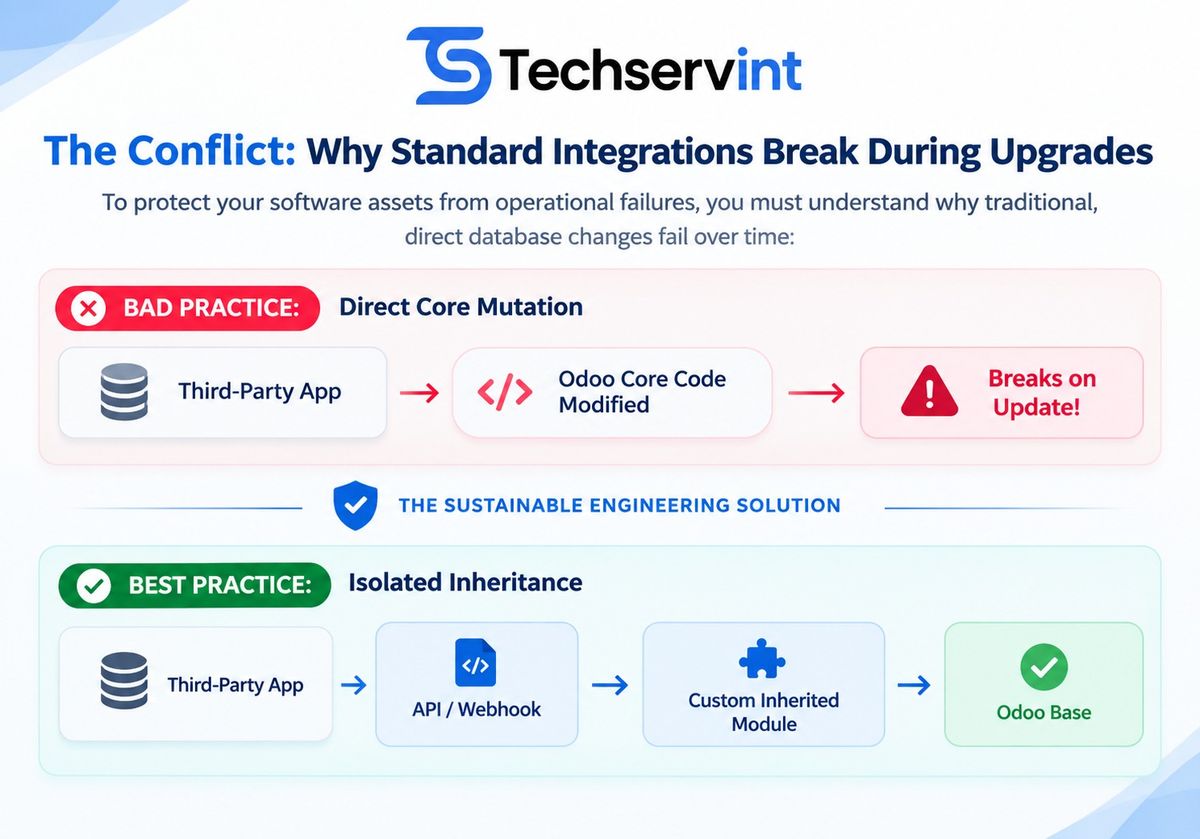
When developers modify the base source code files of Odoo modules directly to accept external data payloads, they create architectural debt. When you initiate an official system upgrade, Odoo’s installation scripts automatically overwrite the default database directories. Any unauthorized core modifications are instantly deleted or mismatched, causing severe database compilation failures and breaking background processing actions.
Sustainable customization models isolate the custom business logic into a completely separate directory layer using Odoo's native inheritance pattern (_inherit). This approach acts as a protected software wrapper. The core application logic remains perfectly clean and untouched, allowing the system to update seamlessly while your external webhooks and integrations continue to run without interruption.
Crucial Benefits of Safe Odoo Integrations
Structuring your integration architecture around update-resilient patterns offers immediate operational advantages:
- Guaranteed Version Upgrade Uptime: Move between different Odoo releases without having to pay developers to completely rewrite your external connectors.
- Absolute Core Data Integrity: Guard against duplicate transaction mapping and broken database tables using secure validation middleware.
- Ultra-Low Maintenance Costs: Eliminate the constant technical debt and bug-fixing routines that plague unoptimized ERP setups.
- Decoupled Architecture Freedom: Modify, expand, or completely replace external third-party software platforms without needing to restructure your inner accounting or inventory structures.
The Technical Framework: 5 Steps to Future-Proof Odoo Integration
Securing an enterprise software layout requires a highly disciplined, risk-mitigated technical blueprint. At Techservint, we build scalable integrations using this field-tested engineering roadmap:
Utilizing Isolated Environments for Sandbox Staging
We never develop or test integration scripts directly on a live production framework. Our engineers stand up an exact replica sandbox or staging instance (typically inside an isolated Odoo.sh container) to simulate live data transactions safely without risking operational disruptions.
Strictly Enforcing the Odoo Inheritance Pattern
When custom database fields or unique logic models are required to handle external webhooks, we build independent modules that inherit base classes cleanly. This ensures your specific operational enhancements reside in their own standalone directories, away from core code updates.
Communicating via Standardized JSON-RPC or REST APIs
We establish clean external data transfer structures using protected REST APIs or Odoo's built-in JSON-RPC and XML-RPC protocol interfaces. External applications interact with the platform using structured web tokens, keeping data access secure and independent.
Implementing Middlewares for Safe Data Mapping
To bridge the gap between different data formats, we configure secure middleware translation pipelines. The middleware acts as an automated validation step, cleaning incoming raw data (e.g., from an external e-commerce sales log) before committing it to Odoo's core modules.
Setting Up Asynchronous Error Logging and Alerting Protocols
Integrations can occasionally drop out due to external server failures or network disruptions. We implement asynchronous queuing mechanisms (like Celery or Redis Task Workers) to log data sync issues, automatically retry failed API connections, and alert administrators before data drops occur.
Architectural Choices for B2B System Connectivity
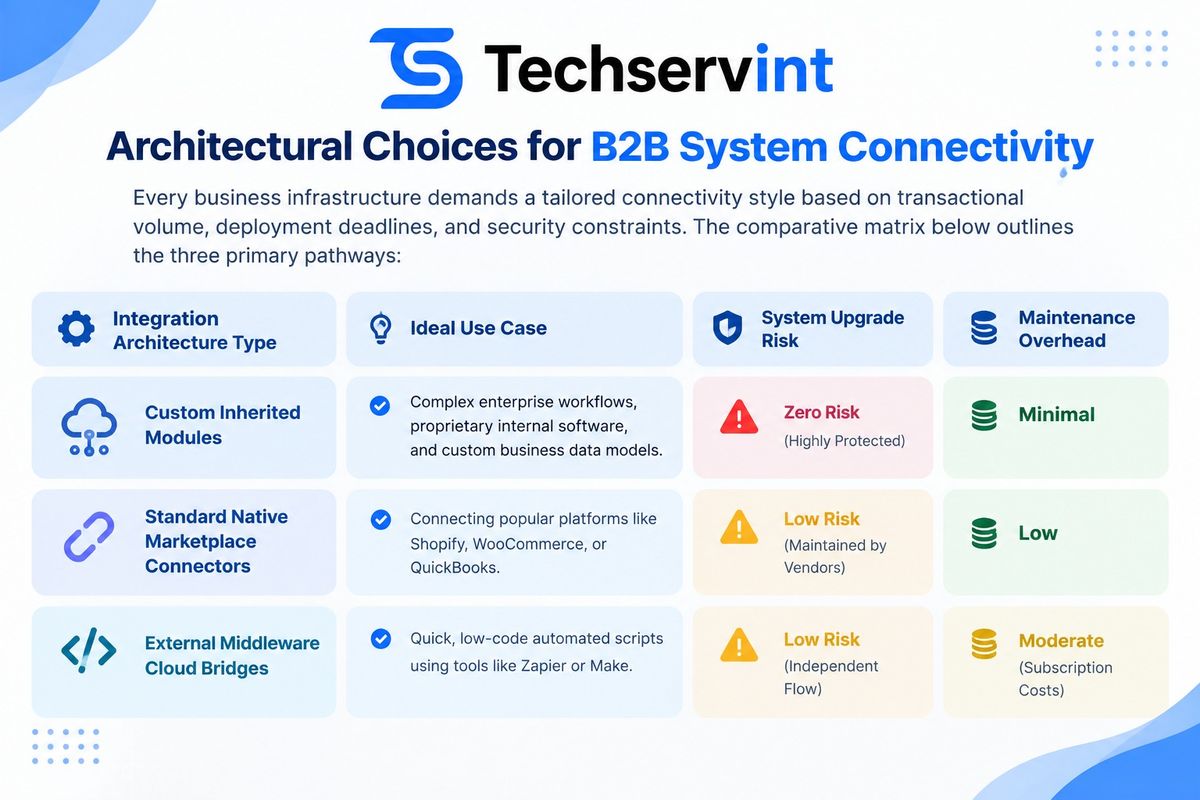
Every business infrastructure demands a tailored connectivity style based on transactional volume, deployment deadlines, and security constraints. The comparative matrix below outlines the three primary pathways:
Overcoming Key Integration Security Challenges
Connecting internal ERP applications to external platforms exposes new digital surfaces to security risks. Here is exactly how our development teams solve these challenges:
Challenge 1: Guarding Hardcoded API Authentication Credentials
- The Problem: Storing raw database passwords or web service API keys inside clear-text module files creates severe security vulnerabilities.
- The Techservint Solution: We utilize Odoo's system environment parameters and encrypted key managers to rotate access tokens dynamically, ensuring private codes are never exposed in the source repositories.
Challenge 2: Synchronizing Asynchronous Stock Changes
- The Problem: If multiple third-party marketplaces make concurrent API calls to update inventory levels at the exact same time, database race conditions can cause inaccurate stock tallies.
- The Techservint Solution: We deploy strict database row-locking mechanisms and structured transactional queues within PostgreSQL, ensuring inventory updates process in exact chronological order.
Challenge 3: Handling Version Payload Deviations
- The Problem: An external SaaS vendor suddenly updates their application, changing their API payload fields and breaking your ERP intake scripts.
- The Techservint Solution: We design our modules with flexible, schema-agnostic validation layers that fall back to sensible defaults and flag unexpected field changes instantly without crashing your system.
Why Partner with Techservint for Your ERP Modernization?
Techservint is a premier enterprise software engineering and digital transformation agency. We specialize in helping modern organizations maximize the utility of their technical frameworks by deploying resilient, scalable business automation components.
We reject shortcuts and quick, fragile software patches that fall apart during updates. Our engineering teams prioritize continuous application uptime, elite cybersecurity data protocols, and clear financial ROI above all else. By matching exhaustive backend database knowledge with cutting-edge API integration frameworks, we deliver the definitive technical architecture your business needs to grow infinitely.
Frequently Asked Questions (FAQs)
Can we update an integrated Odoo database without hiring software developers?
Yes. If your external systems are connected using custom modules that strictly follow Odoo’s native inheritance guidelines, you can safely trigger system migrations through Odoo.sh or the terminal without rewriting your integration pipelines.
How do you secure data transactions passing between Odoo and third-party tools?
We enforce zero-trust security perimeters, deploying end-to-end SSL/TLS data encryption, dedicated limited-privilege API user accounts, and strict role-based access control (RBAC) schemas to protect your operational assets.
How can we connect Odoo to an older legacy system that does not have a web API?
For older software, we construct secure file-based automation scripts or intermediate pipeline databases that extract data logs cleanly and convert them into structured JSON payloads for Odoo.
Ready to Secure Your Enterprise Integrations?
Stop letting fragile, poorly written connectors threaten your application uptime. Partner with Techservint to safely deploy robust, update-resilient third-party Odoo integrations tailored precisely to your operational workflows.
Our elite team of software development architects is standing by to map out a low-risk, high-impact digital plan aligned perfectly with your long-term expansion goals.